
FacilitorFlex: Reserve your workplace yourself!
With the constantly changing corona measures, it is a major challenge to ensure that all employees work safely at the office. Due to working partly at home and at the office, the ‘hybrid working’, flexible workplaces have become much more the new normal post-corona time. The right office and workplace occupancy can prevent any overcrowded office spaces. You may be able to get by with a subscription list on Sharepoint or a secretarial Excel list, but serious and flexible support is required for distribution and monitoring, and FacilitorFlex can offer that!

Solution for now and in the future
FacilitorFlex is the perfect solution for displaying quickly and easily which workplaces are available. You can then immediately reserve one from your desktop (at home or elsewhere) or with the mobile app on your phone. Thousands of flexible workplaces in the Netherlands are now reserved every week with FacilitorFlex. Organisations such as KPN, MN and Aareon use this software to offer their employees secure access to offices, whenever it is permitted. We’ve made connecting really easy, so the office can go live within a few days!
Even when the Covid-19 crisis passes, this solution will continue to prove its worth. It offers much more control over occupancy, which in turn leads to a reduction in accommodation and cleaning costs. Only logical, because if you have insight into the occupancy rate, you can use office space more efficiently.
A brief summary of the benefits of FacilitorFlex:
- Reserve flex/workspaces via a desktop or app
- Select a workplace from a list or on a map
- Fully ISO 27001 certified and GDPR proof
- Easy to switch on, live within a few days
- Low fixed monthly charge
- Can be renewed or cancelled quarterly
Watch the video
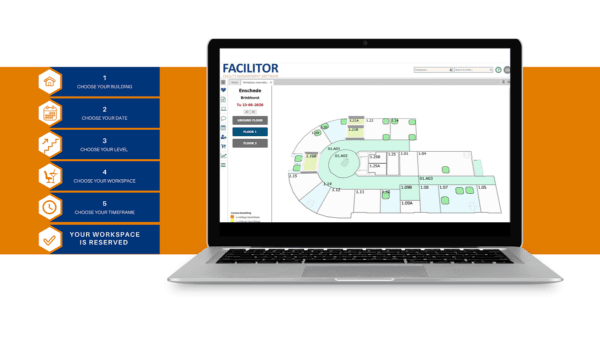
We’ve made a short video to show you how fast, efficient and simple FacilitorFlex is. You can reserve a workplace with just 5 clicks!
Reserve workplaces with FacilitorFlex?
Optional: Actual occupation with DeskGuide
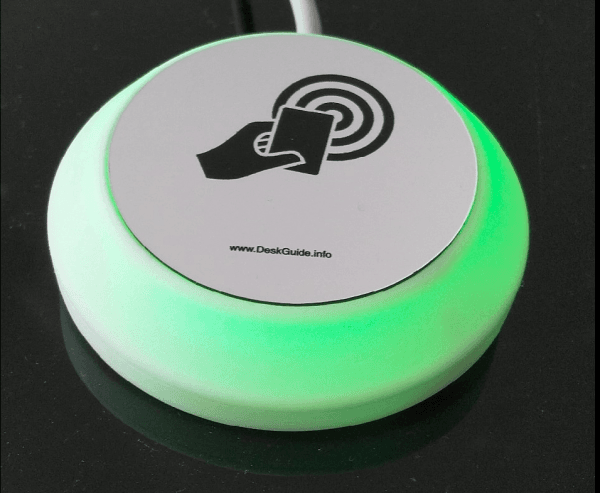
The DeskGuide device can be used at every workplace that can be reserved. If it’s linked to FacilitorFlex, the DeskGuide turns orange if the workplace is reserved. When you arrive at your reserved workplace, you simply hold your tag or staff pass against the DeskGuide to confirm the reservation. The DeskGuide turns red to show the workplace is occupied. Thanks to this system, FacilitorFlex knows when the reserved workspace is actually in use, and the facility manager can always gain insight into actual occupancy in a building, instead of just reservations. No-shows can also be seen easily. Workplaces that aren’t occupied within a certain period of time become available, and immediately visible again. This updated availability is also presented on the floor plans.
DeskGuides are supplied by our partner LeftClick, and are easy to connect with a USB power supply. All that’s required is to register which DeskGuide belongs to which workplace. The equipment requires no Wi-Fi connection, so the infrastructure can be left unchanged.
What other customers say
Arjan van Riet, MN Facilities:
“Workplaces can be reserved quickly, on the basis of what’s available at the time. This product is innovative and relevant, and we’ve become used to it. It helps us to closely monitor observance of the limits in terms of the number of staff in the office.”
Erik Troost, Commercial Product Manager KPN:

“Thanks for coming up with this innovation, and all the hours of work you put in. This is real innovation, and now Facilitor is also showing directly how flexible the product is. It’s really impressive that such a mature product was created and launched in just 2 weeks”
FAQs
1. What colour is the DeskGuide if the workplace is occupied?
The DeskGuide turns green for if the workplace is free, orange if it’s reserved, and red if it’s occupied by the person who made the reservation
2. How fast can this solution be implemented?
FacilitorFlex can go live within a few days. It’s completely standard, and does what it says on the box.
3. How is it implemented?
As part of the implementation process, we ask you how many buildings you have, how many floors in each building, and how many workplaces per floor. We also ask you if you want a link for Single-Sign-On via SAML, if you want to use floor plans, and if you want to use sensors, DeskGuides or both.
4. Does this cover the entire process for going to the office safely?
Yes, FacilitorFlex takes care of the front office, in other words reserving the free capacity, while the optional DeskGuide takes care of the back office, in other words physical registration at the workplace in question.
5. What are the system requirements?
A laptop, computer, tablet or smartphone for FacilitorFlex, as long as it has an internet browser. The DeskGuides and sensors require only a power supply. A network connection with an internet connection is required for the DeskGuide gateway.
6. Does it work with some or all smartphones/NFC?
Yes, the DeskGuide works with all devices with an RFID or NFC chip, staff cards, RFID key tag and smartphones.
7. Is it true that it doesn’t need Wi-Fi or changes to infrastructure?
That’s right, the DeskGuides connect wirelessly to their own boxes (Gateway), which in turn are connected to the internet. The DeskGuides are simply placed at the workplace and connected to the socket via a USB plug. No other infrastructure is needed for them to work.
Also want to use FacilitorFlex?